

Free Fire Diamonds Brazil
BrazilAbout Free Fire
Free Fire is a competitive battle royale survival shooter designed for mobile devices, offering fast-paced matches built around survival, strategy, and combat skills.
Players enter a battlefield with other competitors, choose their landing location, collect weapons, equipment and supplies, move within the safe zone, and fight to remain among the final surviving players.
Free Fire offers multiple game modes, including Battle Royale, team-based combat, fast-paced competitive modes, seasonal events, and regularly updated gameplay experiences.
The game also features a wide range of characters, weapons, cosmetic content, and other digital items that allow players to customize their in-game experience.
Free Fire MAX is also available as an enhanced version of the experience, offering improved graphics and visual effects while maintaining the core Free Fire gameplay.
About Free Fire Diamonds
Free Fire Diamonds are the premium virtual currency used within Free Fire.
Diamonds can be used to obtain eligible digital content within the game, which may include:
Character outfits and cosmetic items.
Weapon skins.
Pets and related content.
Selected bundles and special offers.
Eligible Booyah Pass content and rewards.
Selected event content and draws.
Other supported digital items available within Free Fire.
Free Fire also offers additional in-app purchases such as memberships, Level Up Pass products, Special Airdrops, and multiple Diamond packages.
Card4Play provides direct Free Fire Diamonds top-up using the customer's Player ID / UID. No account password or login credentials are required.
How to Top Up Free Fire Diamonds
Open Free Fire and log in to your account.
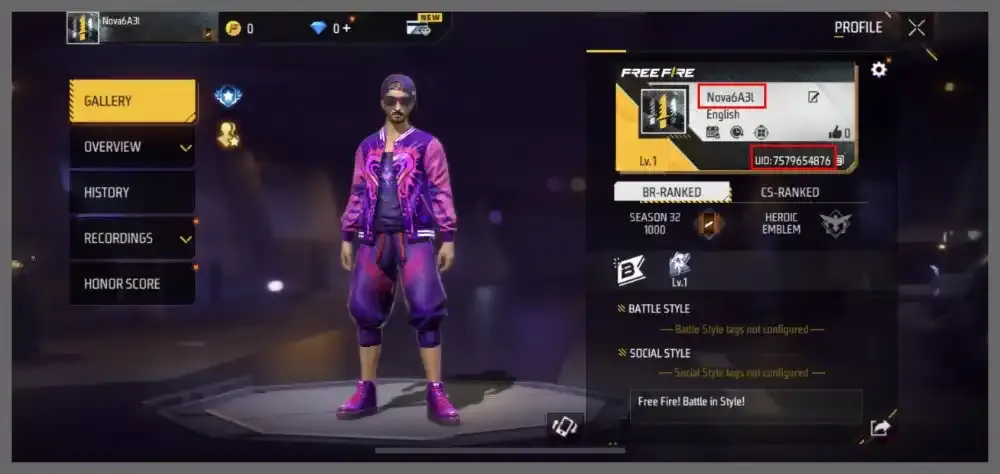
Go to your profile and locate your Player ID / UID.
Enter the correct Player ID on the Free Fire product page on Card4Play.
Select your preferred Diamonds package.
Complete the payment using one of the available payment methods.
After the order is successfully processed, the purchased Diamonds will be credited directly to the Free Fire account associated with the submitted Player ID.
Player-ID-based top-up has also been used by major digital top-up platforms for Free Fire, where the customer enters their ID, selects a package, completes payment, and receives the Diamonds in the game account.
How to Find Your Free Fire Player ID
Open Free Fire.
Tap your Profile / Avatar from the main game screen.
Open your player profile.
Locate your UID / Player ID in your account information.
Copy the number carefully and enter it exactly as displayed when placing your order on Card4Play.
Important Information
Please verify your Player ID / UID before completing your purchase.
Diamonds will be credited to the Free Fire account associated with the Player ID submitted during checkout.
No Free Fire password or account login credentials are required.
No redemption code is required when Card4Play provides the product through direct account top-up.
Successfully completed top-ups may not be reversible once the Diamonds have been credited to the submitted account.
Available Diamond packages, bonuses, promotions, and digital content may vary depending on region and product availability.
Bonus Diamonds may vary according to the selected package and active promotion.
Delivery time may vary depending on order processing and service availability.
Card4Play does not require access to the customer's Free Fire account.
Free Fire Diamonds are digital virtual currency intended for use within Free Fire.